Custom Shopify themes
Custom Shopify themes, built in Sydney
A custom theme gives you a store that looks like nobody else's and that your team can still edit. We design in Figma, build in Online Store 2.0 and hold product pages to a speed budget.
Right for you if
- You have outgrown a premium theme and keep asking developers to hack around its limits.
- Your brand relies on a distinctive layout, such as editorial collections, build-a-bundle or a made-to-order flow.
- Page speed on mobile is hurting your ads and rankings.
- You want a theme you own, with code your next developer can read.
What's included
- Bespoke design in Figma for desktop and mobile
- A theme built on Online Store 2.0 with JSON templates, sections and blocks
- Custom sections your team can edit without us
- Metafield and metaobject setup for richer product and content data
- Bundles, subscriptions, gift cards, size guides or engraving, as needed
- A speed budget with product pages under 2.5s LCP on mobile
- Accessibility pass covering contrast, focus order, labels and keyboard use
- Version control, documentation and 30 days of priority fixes after launch
What a custom theme is, and what it is not
A custom theme is a Shopify theme written for one brand. It uses Liquid, Shopify's templating language, plus CSS and JavaScript, and follows the Online Store 2.0 structure so every template can be composed from sections in the theme editor. It is not a headless build and it is not a heavily modified copy of a marketplace theme with the original author's code buried underneath.
The distinction matters. A modified marketplace theme drags along features you never use, scripts that slow the page, and update conflicts. A custom theme includes only what your store needs. That is why we can hold a speed budget: fewer scripts, properly sized images, and no layout shift from late-loading widgets.
Custom does not mean your team loses control. We build sections for the things you will actually change, such as a promo banner, a feature row, a collection grid or a lookbook, and we name settings in plain language. The aim is that you launch a sale on Friday without opening a ticket.
How we build a theme
Step 1
Step 1: Brief and audit
We review your current store, analytics and customer questions, then write a short brief naming the jobs the new theme must do and the apps it can replace with native features.
Step 2
Step 2: Design in Figma
Key templates for desktop and mobile, with a component library. You approve designs before any code is written.
Step 3
Step 3: Build sections and templates
We develop on a development store with version control, building reusable sections first and templates second. You get a preview link each week.
Step 4
Step 4: Performance and accessibility
We measure Core Web Vitals on mobile, trim scripts, size images and fix anything that fails. Our notes on Shopify speed and Core Web Vitals explain what we target and why.
Step 5
Step 5: Handover
We publish the theme, hand over the repository and documentation, and train your team. If you move from another platform, we run the redirect map described in Shopify migration.
Features we build most often
Australian brands tend to need a handful of features that themes handle poorly. We build them natively where we can, so you are not paying monthly for an app that does one small thing.
- Size guides that change by product type, with measurements in centimetres
- Delivery estimates by postcode, and a free-shipping progress bar
- Age verification for alcohol, with the compliance points in selling alcohol online with Shopify
- Build-a-bundle and gift-set selectors that add several items to cart at once
- Subscription selectors for coffee, pet food or skincare refills
- Engraving or personalisation fields that pass through to the order and the packing slip
- Wholesale sign-up forms feeding into Shopify B2B
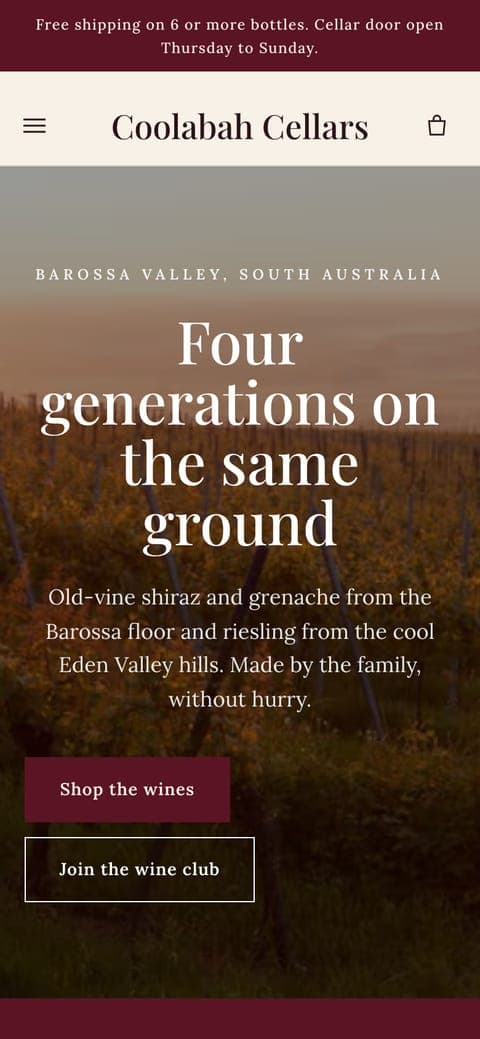
You can see several of these in the concept stores we designed, including Seam Jewellery with engraving and Coolabah Cellars with an age gate. They are concept stores, not client work, but they show the standard we build to.
Honest trade-offs
Custom costs more up front and takes longer than a premium theme. You also take on responsibility for the code: if you hire another agency later, they work on your theme rather than relying on a vendor's updates. We document the build and use plain, conventional Liquid to keep that handover easy.
| Premium theme | Custom theme | |
|---|---|---|
| Upfront cost | Lower | Higher |
| Design freedom | Within the theme's layouts | Anything Shopify can render |
| Page weight | Includes unused features | Only what the store needs |
| Updates | Vendor releases updates you must merge | You control changes |
| Best for | First stores, simple ranges | Established brands with specific needs |
If a premium theme will do the job, we will tell you, and sell you Launch instead. A bespoke theme should earn its cost through conversion, speed or a feature your range truly needs.
Pricing and timing
8 to 10 weeks
Custom themes are delivered in our Custom package at $18,500 excluding GST, which also includes migration from WooCommerce, Neto, BigCommerce, Wix or Squarespace. Larger builds with Shopify Plus features are quoted under Plus after a scoping call. After launch, Care at $390 a month covers fixes and updates, and Growth at $1,450 a month adds a monthly improvement.
Custom Shopify themes: common questions
What does a custom Shopify theme cost in Australia?
Our Custom package is $18,500 excluding GST, fixed price, and includes bespoke design, a custom theme and migration if you are moving platforms. Shopify Plus builds with extra requirements are quoted separately.
Will my team be able to edit a custom theme?
Yes. We build sections in the theme editor for the content you change often, name every setting in plain language and run a training session. You should not need a developer to launch a sale or swap a banner.
Do you build headless Shopify stores?
Rarely. Headless adds cost and maintenance, and most brands get faster, cheaper results from a well-built Online Store 2.0 theme. We will say so if a headless build is genuinely warranted, which is uncommon outside very large catalogues.
Who owns the theme code?
You do. We hand over the repository and documentation at launch, and the theme lives in your Shopify store.
How do you keep a custom theme fast?
We set a speed budget before building, use native Shopify features instead of apps where possible, size images properly, defer non-critical scripts and test on mid-range mobile devices. We aim for product pages under 2.5s LCP on mobile.
Can you customise a theme I already have?
Yes, if the base theme is sound. If it is heavily patched, a clean rebuild is often cheaper than more patches. A short audit tells us which case you are in.
Example stores
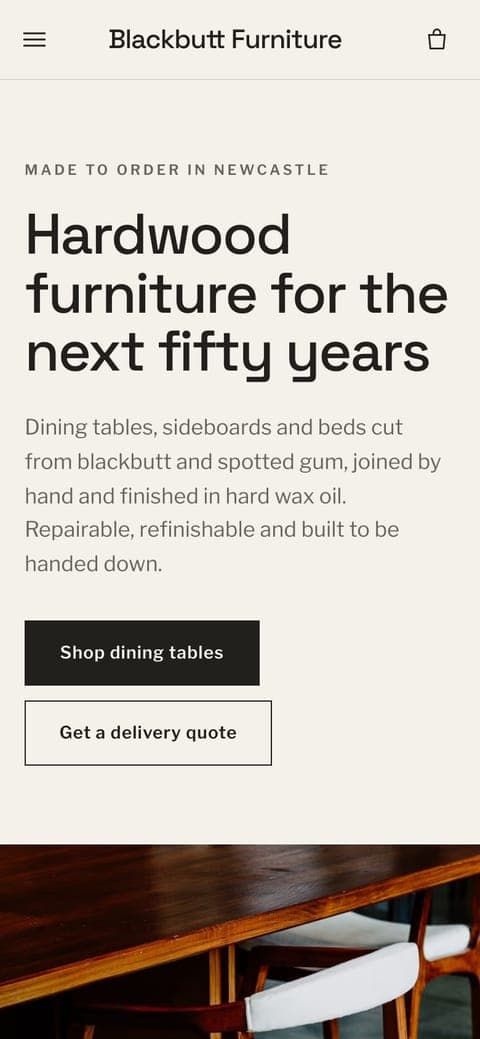
All twelveConcept stores we designed and built to show our work. Click through to shop them.

Further reading
Guide9 min read
How to make a Shopify store fast: themes, apps, images and Core Web Vitals
Shopify's own help centre says the theme and the apps you install are the biggest factors in store speed. Most of the work is deciding what to leave out.
Costs8 min read
How much does a Shopify website cost in Australia?
There are two bills: the one to build the store and the one that arrives every month after. Here is how both break down for an Australian brand, in AUD, with the figures we could check and the ones we will not guess at.
Guide9 min read
Selling alcohol online in Australia with Shopify
Shopify will host a bottle shop, but it will not hold your licence for you. Each state sets its own rules for who can sell, who can receive and how it gets delivered.
Tell us what you sell
A few lines about your store and where it's at. We reply within one business day with questions or a fixed quote.